AI search checklist: 15 steps to get your content cited by AI tools
By Shalini Murthy · Last updated 18 November 2026
To get cited in Google AI Overviews, ChatGPT and Perplexity, a page needs one clear intent, the answer right at the top, a structure AI tools can lift, proof worth quoting, and regular refreshes. This 15-step checklist covers all of it, from before you write a word to after you hit publish.
“How do you think about optimizing content for AI search?” is the question I get asked most, in interviews, client calls and sales calls. So instead of answering it differently every time, I built one checklist, and I run every piece of content through it. Use it on your own pages.
Key takeaways
- A page that tries to explain, compare and sell at once is a weak match for all three, so give every page one primary intent.
- AI tools lift fragments, not pages, so every heading, bullet and step should still make sense when it's read on its own.
- AI tools cite proof rather than claims, so back every claim with a sourced stat, a named framework or a real result with a timeframe.
- Most AI Overview problems aren't advanced problems; they come from basics that are only done halfway.
- Revisiting each page every ninety days keeps it accurate, because AI tools avoid citing information that's out of date.
The AI search checklist
Tick off each step as you work through a page; your ticks are saved in this browser. Open “Why it matters” under any step for the reasoning and when to break the rule.
- Stage 1 · Before you write
Why it matters and how to apply it
Why it matters: When an AI tool pulls an answer, it’s matching a page to a question. A page trying to explain, compare, and sell all at once is a weak match for all three.
How I do it: A manual SERP analysis, plus a quick check inside two or three LLMs.
Type in the keyword and look at the kind of answer you get back. Is it an explanation or a list of options or a recommendation? That tells you what the tool thinks the person wants.
When to break it: Don't! If you find two intents, that’s two pages. Write both and link them to each other.
Why it matters and how to apply it
Why it matters: Keyword tools give you the topic. Your buyers give you the phrasing. And the way they ask it on a sales call is the way they’ll type it into ChatGPT.
When you test it in an LLM, watch the answer. If the LLM answers a different question, your phrasing needs work.
- Stage 2 · Structure the page
Why it matters and how to apply it
Why it matters: AI tools answer questions. A heading that mirrors the question makes it easy for them to match the section underneath to a query.
When to break it: Not every heading should be a question. In a how-to piece, headings like “Step 1: Pick one intent” and “Step 2: Find the real question” work better than turning each one into a question.
If your H1 states the answer clearly, don’t rewrite it into a question just to tick a box.
Why it matters and how to apply it
Why it matters: If your answer sits in paragraph six, behind a story about how you got into the industry, it gets skipped.
Your story can still be there. It just goes after the answer, not before.
Why it matters and how to apply it
Why it matters: AI tools lift fragments, not pages. A bullet that says “This makes the process much easier” means nothing on its own. What process? Easier than what?
Think of it this way: if I pasted this one bullet into a Slack message with no context, would it still make sense? If not, rewrite it.
- Stage 3 · Make it worth citing
Why it matters and how to apply it
Why it matters: AI tools don’t cite claims; they cite proof. Saying you improved visibility is just a claim. Showing that a page went from 0 clicks to an AI Overview citation in two weeks is proof, and that’s what an AI tool can repeat and credit you for.
One warning: don’t invent numbers to fill this gap. If you don’t have the data yet, show what you’ve done and where you stand today. Honest progress is still proof.
Why it matters and how to apply it
Why it matters: People are asking AI tools for recommendations in full sentences now. Not “best CRM,” but “best CRM for a 10-person agency that already uses HubSpot.” When you’re clear about who you’re not for, the tool can be more confident about who you are for.
Bonus: it filters out the wrong leads before they ever reach your inbox.
Why it matters and how to apply it
Why it matters: Comparison queries are where AI tools build tables themselves. Give them one that’s already clean.
Why it matters and how to apply it
Why it matters: Numbered steps are easy to extract and reproduce in order. Nested sub-steps fall apart the moment they’re lifted out of the page.
If a step needs its own sub-steps, it’s probably two steps.
Why it matters and how to apply it
Why it matters: Every FAQ is another entry point for a long-tail query.
- Stage 4 · Connect it
Why it matters and how to apply it
Why it matters: Anchor text tells both readers and crawlers what’s waiting on the other side. A link that just says click here tells them nothing.
A link that names the page, like a guide to running a manual SERP analysis, tells them exactly what they’ll get before they click.
Why it matters and how to apply it
Why it matters: A generic CTA like “contact us” speaks to everyone and convinces no one. A CTA that names the reader and the result they’ll get lets the right buyer see themselves in it straight away.
- Stage 5 · After you publish
Why it matters and how to apply it
Why it matters: Your H1 is for someone already on the page. Your title tag is for someone scanning a list of results and deciding where to click.
Why it matters and how to apply it
Why it matters: Your changes don’t count until Google sees them. Resubmitting tells Google the page has changed, so it can recrawl it sooner instead of whenever it gets around to it.
Why it matters and how to apply it
Why it matters: An AI tool doesn’t want to cite something that’s no longer true.
But a refresh doesn’t mean rewriting the page from scratch. If your headline made a promise, like a specific budget, price, or result, keep it. Update the data underneath it so the promise still holds today.
And don’t change the URL slug. Changing it means losing whatever position the page already has, plus broken backlinks and 404s if the redirects aren’t set up properly.
Does this checklist actually work?
After I shared a short version of this checklist on LinkedIn, a connection who's building her travel blog took her own blog optimization checklist and tallied it against mine. Not every point overlapped, but most did, and those were the ones she applied to one blog post.
Before her changes (6 September 2026):
- 0 clicks
- 15 impressions
- An average position of 6.8
Two weeks later (22 September 2026):
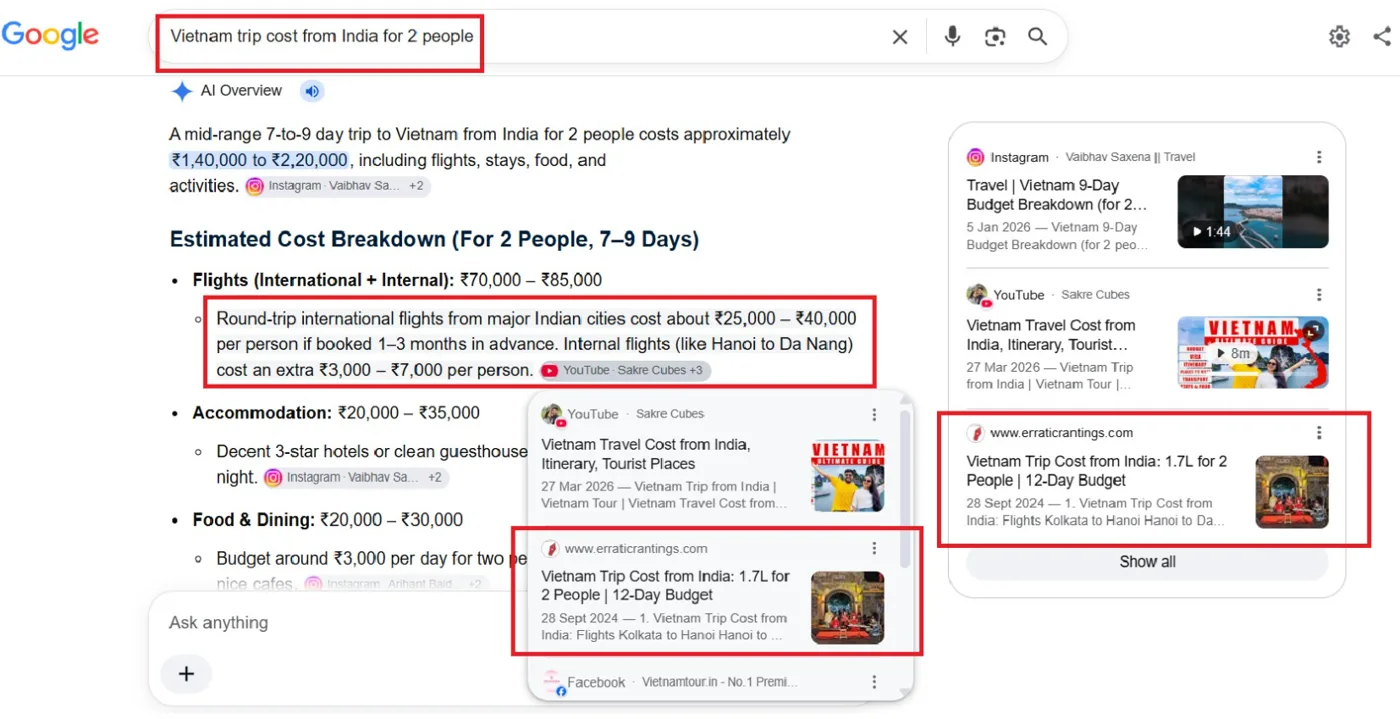
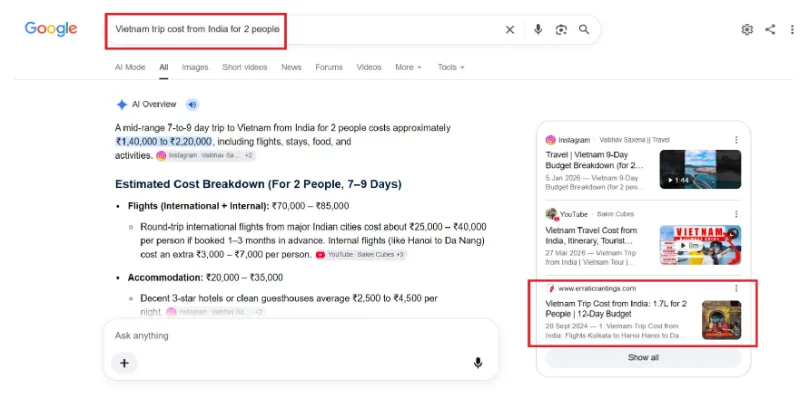
- Google's AI Overview was citing the post for “Vietnam trip cost from India for 2 people,” a long-tail version of her primary keyword.
- It ranked at position 7 for that query and position 4 for “Vietnam trip for 2 people cost.”
I wasn't surprised. I've used this checklist across client work, and it holds up every time. Most AI Overview problems aren't advanced problems; the basics are just done halfway.
This isn't an exhaustive checklist. It follows the basic principles of good content, done properly. If you're trying to optimize for LLMs, stick to the basics and do a damn good job of them. That's really the whole game.
Who is this checklist for?
- For: content marketers, SEOs, founders and writers who publish informational or comparison content and want it to show up in AI answers as well as in Google.
- Not for: anyone looking for a shortcut or a trick to game AI tools. Every step here is about making a page genuinely easier to understand, trust and quote.
How should you start?
Pick one page this month and run it through the checklist. Note your Google Search Console numbers before you start, then check them again in two weeks. Let the numbers tell you whether it worked.
Frequently asked questions
How do I optimize content for Google AI Overviews and ChatGPT?
Start with one clear intent per page and the real question your buyers ask. Make that question the H1, answer it in the first two or three sentences, and add a key takeaways block of standalone bullets. Back every claim with something quotable, like a sourced stat or a client result with a number and a timeframe. Then link to related pages, resubmit the page in Google Search Console, and refresh it every ninety days.
Do I need separate content for AI search and for Google?
No. This checklist follows the basic principles of good content, done properly. The same page can rank in Google and be cited by AI tools when it answers one question clearly, is structured so sections can be lifted on their own, and backs its claims with proof. Most AI Overview problems aren't advanced problems; the basics are done halfway.
Should every heading be a question?
No. Write the H1 and H2s as full questions wherever it's sensible, because AI tools match sections to queries. In a how-to piece, step headings like “Step 1: Pick one intent” work better than questions. If your H1 already states the answer clearly, don't rewrite it into a question just to tick a box.
How long does it take to see results?
It varies by page and site, but changes can show up quickly. In one example, a travel blog post went from 0 clicks and 15 impressions to being cited in Google's AI Overview for a long-tail query within about two weeks of applying the checklist. Note your Google Search Console numbers before you start, then check again in two weeks and let the numbers tell you whether it worked.
How often should I update a page for AI search?
Revisit every page every ninety days. Refresh a stat, add a new FAQ, update the modified date, and resubmit it to Google Search Console. Keep any promise your headline makes, such as a budget or a result, and update the data underneath it. Don't change the URL slug, because you'll lose the position the page already has.
More organic growth. Less hiring overhead.
I lead SEO, content and AI search for you, and leave behind systems your team can scale.
Found this useful? I share one practical guide like this every week. Come join me on my newsletter.
More from me: data governance SEO case study · AI-driven content workflow case study · all free resources
AI Search Checklist: 15 steps to get cited by AI tools
Shalini Murthy · shalinimurthy.com/resources/ai-search-checklist
Before you write
- ☐ 1. Map one primary intent per page. Informational, comparative or conversion: pick one before you write a word. Run a manual SERP analysis and a quick check in two or three LLMs to confirm the intent.
- ☐ 2. Find the real question first. Pull it from sales call transcripts, support tickets, Semrush question keywords and People Also Ask, then test the phrasing in a few LLMs.
Structure the page
- ☐ 3. Make that question the H1. Write every H2 as a full question too, wherever it makes sense.
- ☐ 4. Answer the H1 in the first two or three sentences. Give direct value straight away, with little to no fluff.
- ☐ 5. Add a key takeaways block right after the intro. Three to five bullets, each one standing completely on its own and showing the reader the value they'll get from the piece.
Make it worth citing
- ☐ 6. Back every claim with something quotable. A sourced stat, a named framework, a comparison table, or a client result with a real number and a timeframe attached.
- ☐ 7. Add a “who this is for, and who it’s not for” section. It helps AI tools recommend you to the right buyer instead of just anyone.
- ☐ 8. Add a comparison table for any “best X” or “X vs Y” piece. Option name, key strength, best fit and one differentiating detail, laid out as an actual table so it reads cleanly.
- ☐ 9. Use numbered steps for any process. Never prose-only. One to three sentences per step, a flat structure and no nested sub-steps.
- ☐ 10. Close with an FAQ section. Five to eight questions pulled from real search data, each answered fully in two to four sentences.
Connect it
- ☐ 11. Add descriptive internal links to three or more related pages. Use anchor text that names the page, so readers and crawlers know what's on the other side. Never “click here”.
- ☐ 12. Close every page with a CTA that spells out exactly who it’s for and the outcome they’ll get. Make it specific enough that the right buyer immediately sees themselves in it.
After you publish
- ☐ 13. Revisit the meta title and meta description. Write the title tag separately from the H1: keyword first and under 60 characters. Keep the meta description under 150 characters.
- ☐ 14. Go to Google Search Console and resubmit the page for indexing. Don't wait for Google to find the changes on its own.
- ☐ 15. Revisit every page every ninety days. Refresh a stat, add a new FAQ, update the modified date and resubmit to GSC. Keep the URL slug the same.
Run one page through it this month. Note your Google Search Console numbers before you start and again two weeks later. · Fractional Head of Content & SEO for B2B SaaS · shalinimurthy.com